
Does the preview show the finished crocheted object?
The construction preview helps explain the proposed making plan. It does not predict the finished crocheted object. Materials, stitch tension, stuffing and assembly can change the final size and appearance.
Physical results require a record of actually following a particular version of the instructions with stated materials. A rendered shape alone does not provide that record.
What does each view mean?
- Your reference
- The image you uploaded. It describes the visual idea, including details that may not appear in the proposed making plan.
- Target shape
- The proposed 3D interpretation to inspect before continuing. Check its silhouette, proportions, visible features and upright direction.
- Construction preview
- A view of the recorded construction. When the result supports it, referenced outputs from the instructions can be located here.
- Layout approximation
- An additional model layout where available. It remains a computational view, rather than a measured physical result.
How are the preview and instructions connected?
A complete model plan records construction outputs and the English steps that refer to them. In supported results, select an instruction reference to locate the corresponding output on the construction view. Inspect the result's own notices for unavailable or unresolved steps.
This connection can help answer “which part of the construction does this step describe?” It does not establish that every physical movement, material choice or finished proportion has been tested.
Which part of the construction does a step describe?
In the actual sphere model plan, the step below uses output 2 as its target and creates outputs 7, 8 and 9. The numbered points come from the same saved construction as the English instruction.
Actual sphere plan · Complete model pass 1
Work sc, sc, sc into stitch 2; number the new stitches 7, 8, 9.
Here, sc means single crochet in US terms. These are construction output numbers, assigned in making order, rather than round numbers or measurements. Output 2 is the second foundation chain. This step works three single crochets into that one target.
- Work into
- Existing output 2 — the amber point.
- New outputs
- 7, 8, 9 — the green points created by this step.
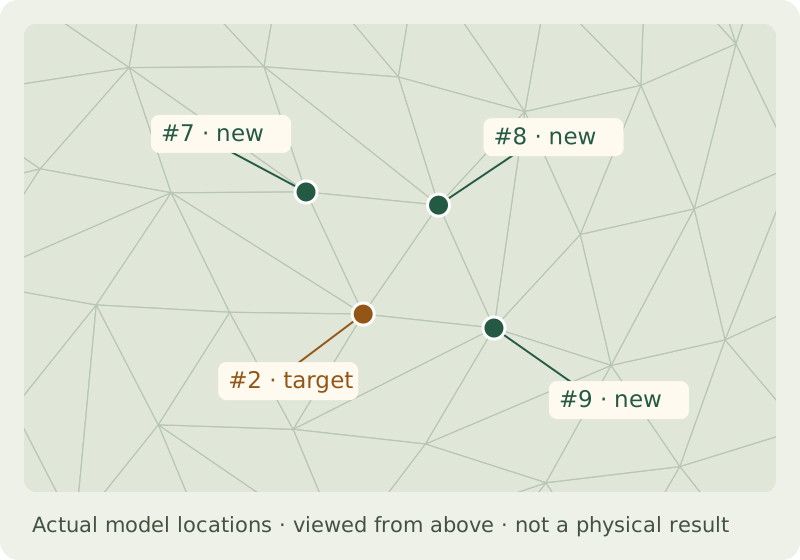
Compare this excerpt with the same saved English plan. The step and coordinate record binds it to that plan and its checked construction. Read the specific checks and their limits before interpreting the result as a making pattern.
This is a synthetic model example, not a photo conversion or physical trial. The sphere case and its evidence record the source, version and unresolved requirements.
What do complete and incomplete mean?
A complete model plan has passed the checks recorded for that particular result. An incomplete draft has unresolved requirements. Both statuses are separate from test-crocheted.
Some results can include a complete derived model plan while the original source draft remains incomplete. Keep the result's individual statuses together when assessing it. The sphere check scope gives concrete pass conditions and examples of mismatches, alongside what the checks cannot establish.
What should I review before making?
- Whether the target shape still communicates the features you wanted to keep.
- Whether the instructions describe the necessary making and finishing actions.
- Which requirements or references are unresolved.
- Which measurements and materials were used, and what has actually been physically checked.